On this page
- How to run This or That
- Prompts by grade and subject
- Warm-ups, debates and brain breaks
- When not to use it
- FAQ
How This or That works
The This or That widget is a two-button vote. One side is teal, the other amber, and each shows a label, a big number and a percentage. Students choose, you tap, and the class sees the split straight away.
Set it up
- Open the free board and choose This/That from the widget menu.
- Press the pencil button. Two text boxes appear, one for each side.
- Type a short label in each box, such as "Cats" and "Dogs" or "Fraction" and "Decimal".
- Press Save. Any earlier votes are cleared.
- Drag the corner to make the widget large, then press the board's Fullscreen button.
Collect the votes
- Students show their choice with a hand signal, by standing on one side of the room, or by holding up a card.
- Tap the left or right button once for each student. The number and percentage update on every tap.
- Press Reset when you want to run the same question with another class.
Votes are typed in by you, not sent from phones, so there is nothing for students to join. That also means the count is only as accurate as your tapping. For a large class, count heads first and tap in the totals while you read them aloud.
Use the template for more than two choices
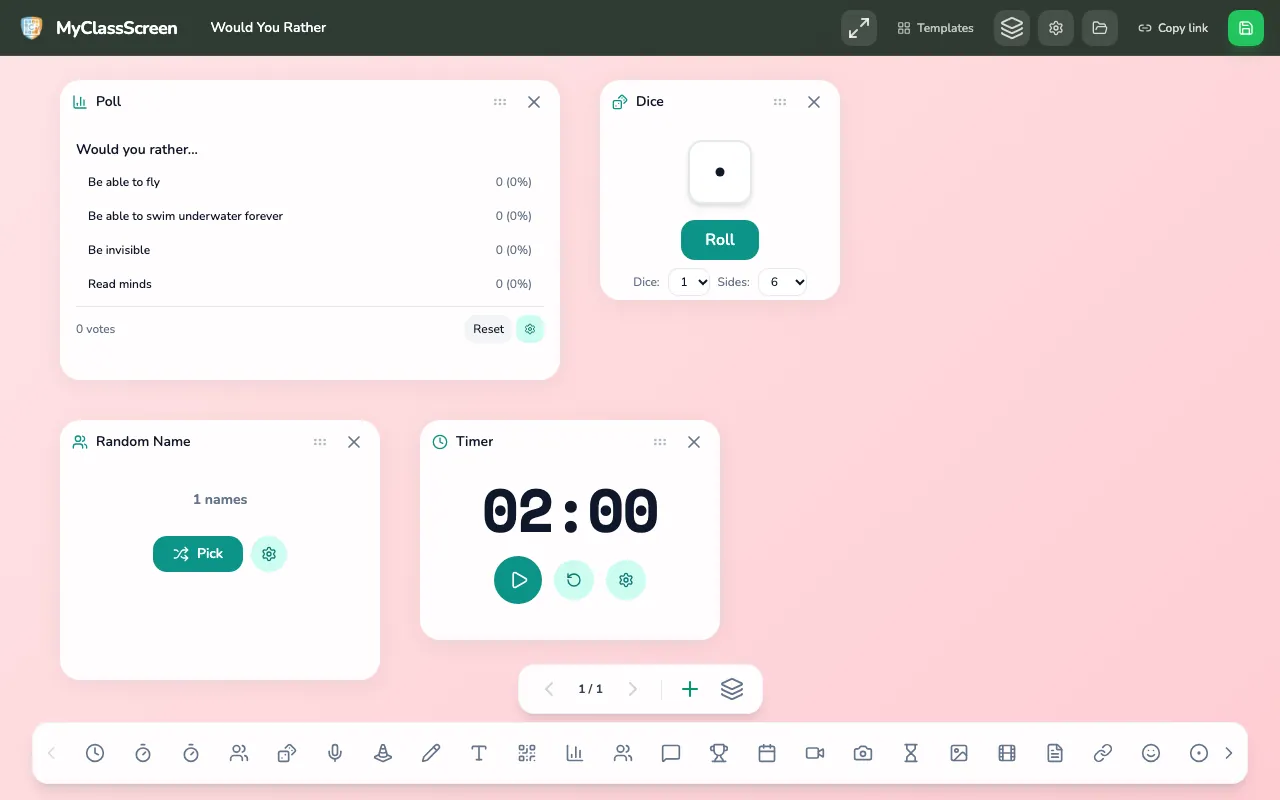
The Would You Rather template is a ready-made version for bigger questions. It uses a Poll with four choices instead of the two-button widget, and adds a Dice, a Name Picker set to "Debate Leader" and a 2-minute Timer. Edit the poll to two choices if you prefer, or add the This/That widget alongside it.
| You want | Use |
|---|---|
| Two clear sides, big and readable | This/That widget |
| Three or four options | Poll widget, or the Would You Rather template |
| A timed debate after the vote | Template, or add a Timer to your board |
| A random speaker for each side | Add a Name Picker or Wheel |
Prompts by grade and subject
Keep each label to a few words so the back row can read it. Fun prompts build the habit; academic prompts give you information.
Kindergarten to grade 2
- Rainy day or snowy day?
- Count by twos or count by fives?
- Story with animals or story with robots?
- Circle or square: which shape has more corners? (Answer: square. Ask a student to explain.)
- Inside play or outside play?
Grades 3 to 5
- Bigger: 0.4 or 0.35?
- Noun or verb: "run" in "I went for a run"?
- Is a tomato a fruit or a vegetable, scientifically speaking?
- Would you rather live in the desert or the rainforest? Give one fact to back it up.
- Multiply first or add first in 3 + 4 × 2?
Grades 6 to 8
- Ratio or rate: "60 miles per hour"?
- Primary or secondary source: a textbook chapter on the Revolution?
- Is the narrator reliable or unreliable so far?
- Physical change or chemical change: rusting nail?
- Better strategy for this word problem: draw a diagram or write an equation?
Grades 9 to 12
- Correlation or causation in today's headline?
- Which method is faster here: substitution or elimination?
- Did the author's tone shift: yes or no? Point to a line.
- Exothermic or endothermic: an instant cold pack?
- Strongest cause of the conflict: economic or political?
Turning a fun prompt into a recall prompt
A quick way to make a warm-up academic is to ask about yesterday's lesson instead of opinions. "Which came first, the Magna Carta or the printing press?" asks students to pull a fact from memory. Retrievalpractice.org, founded by cognitive scientist Pooja Agarwal, explains that asking students to recall what they learned, rather than re-reading or being told, strengthens long-term learning [1]. Keep these questions low-stakes and ungraded.
Ways to use it in class
Two-minute warm-up
Put a This or That question up as students arrive. When the bell goes, take the vote, read out the split, and ask one volunteer from each side to give a reason. Start a two-minute Timer so the warm-up ends on time. Edutopia's advice on transitions stresses predictable cues; running the same opener every day gives students one [2].
Take-a-side debate
- Label the two sides of the room to match the widget.
- Give thirty seconds of silent thinking, then students walk to their side.
- Tap the totals into the widget so the split stays on screen.
- Each side gets one minute to agree on its best argument.
- Anyone persuaded by the other side may cross over. Run the vote again and compare.
The crossing-over step teaches that changing your mind for a good reason is a strength. Use a Name Picker for the speaker on each side so the same confident voices do not speak every time.
Movement brain break
After a long stretch of seated work, read out quick pairs: jump or squat, wave left or wave right, tiptoe or march. Students act out their choice for ten seconds. Offer seated versions of each move so that everyone can join in, and keep the pace fast. The board can show the pair in large text so students who cannot hear clearly still follow along. Seasonal idea: a Veterans Day vs Memorial Day sort. More voting activities for the classroom.
Lesson hinge
Halfway through a lesson, put up a This or That question with one right answer. If the split is close, students are not ready to move on. Pause, ask one student from each side to explain, and reteach the step that caused the split.
Settings and features
The vote buttons and Reset are the controls.
| Control | What it does | When to change it |
|---|---|---|
| Vote buttons | Record a vote for one side or the other. | The prompt is on the screen. |
| Reset | Clears the votes. | You are moving to the next prompt. |
Ready-made boards
Would you rather
A two-choice board ready to project.
Open this board
Accessibility and privacy
Read both choices and the result aloud. Votes stay on this screen. They are not a grade and they are not synced. Save Board keeps the layout in this browser. The board does not load ads.
When not to use it
- For personal or identity topics. A visible split on beliefs, family situations or anything private can expose students. Keep questions about ideas, not people.
- When the honest answer is "it depends". Forcing a binary on a complex issue can mislead. Use a Poll with a "Both" or "Neither" option, or a written response instead.
- When the minority side will be teased. If a 28 to 2 split would make two students uncomfortable, take votes with eyes closed or skip tapping in the numbers.
- When you need to know who chose what. The widget shows class totals only. Use a written check or a form for individual answers.
- When the room is already loud. A take-a-side debate adds noise and movement. Save it for when there is time to settle afterwards.
Related articles
Sources
- Retrievalpractice.org, "What is retrieval practice?": https://www.retrievalpractice.org/why-it-works
- Edutopia, Todd Finley, "Mastering Classroom Transitions": https://www.edutopia.org/article/mastering-transitions-todd-finley/
Run one This or That question tomorrow morning. Two words on screen and a two-minute timer are enough to start the routine.