Free Tool

Dice Roller for Smartboard & Classroom Activities

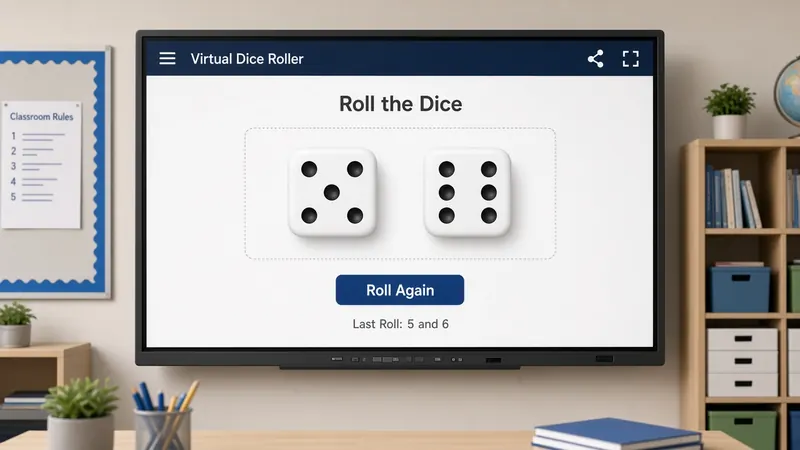
Roll up to four custom dice silently on your smart board. Perfect for math games, probability exercises, and icebreakers.

Need a dice roller for smartboard lessons without the clatter of plastic cubes? MyClassScreen's free virtual dice roller projects up to four customizable dice — D6 through D20 — so the whole class sees the same result at once. Tap or press space to roll; no student accounts, no app install. Open it in any browser and project.

Why I stopped passing out plastic dice

Physical dice look harmless until you hand them to thirty kids at 9:15 a.m. Within a minute someone is crawling under a bookshelf. Another group is debating whether a die landed on a five or a three. The clatter carries through cinderblock walls, and the colleague next door gives you that look through the shared door window.

A virtual dice roller for teachers keeps the randomness without the chaos. Project two dice—or four when the lesson needs it—and roll with a tap or the space bar. Numbers land large enough for the back row. Everyone sees the same result at the same moment. No cubes vanishing into hoodies. No subs hunting the floor during indoor recess cleanup.

I still keep a bag of foam dice in a drawer for outdoor math, but day to day the projected roller lives on my classroom screen next to the timer and scoreboard. Setup takes seconds. Roll forty times in two minutes during a probability talk and students actually watch frequencies emerge instead of fumbling with individual rolls.

Math games that run smoother on the board

Mental math warm-ups are the easiest win. Roll two D6 and ask for the sum before the animation stops. Switch to product on the next round, then difference. Younger grades can track odd versus even across ten rolls while someone tallies on chart paper. The digital dice set the pace; students stay focused on the math instead of arguing about a bounce.

Customize faces when the standard cube feels too small. Percents lessons often want D10. Enrichment blocks love D20—the kids already speak that language from games at home. You can mix face counts on one screen, roll four at once, and compare outcomes without swapping physical sets between table groups.

Review days get structure fast. Jeopardy-style games need random category picks and point swings. Let dice choose the column while the classroom scoreboard tracks team totals. Add a countdown timer for each round and you can float between groups instead of playing game show host every thirty seconds.

Probability lessons students can actually see

When every student rolls once and reports a number, you lose ten minutes to distribution and someone always claims they rolled a seven on a six-sided die. When you roll repeatedly on the board, the class watches repetition in real time. "Why did six show up four times in a row?" becomes a honest conversation about luck versus long-run patterns—not a lecture you prepared the night before.

Sample-space work feels concrete when students predict sums for two dice, then watch you roll twenty pairs and compare predictions to results. Screenshot the final values if notebooks need evidence. Pair the roller with the random name picker so the number of practice problems matches the number rolled—three on the dice means three volunteers, chosen fairly.

Quiet rooms, subs, and back-row readers

During silent reading or testing, passing dice is off the table. A quick projected roll from the front gives lab groups random trial numbers without breaking the hush. Substitutes inherit clearer routines when dice rules sit in a text box and the roller does the random part—no mysterious tub of materials in the closet.

Some students struggle with fine motor tasks or flinch when physical dice bounce unpredictably. Large on-screen numbers with a short animation give extra processing time. ESL learners catch the result while you narrate it. The back row stops squinting at tiny dots on foam cubes.

Table games during indoor recess or reward time stay calmer when rolls happen on the board instead of across desks. Board-game club advisors can run quick RPG-style checks without hauling a dice tray from home. Even homeroom attendance games—roll to pick a column for shout-outs—feel fair because everyone watched the same animation finish.

Fitting dice into your existing board

Place the dice widget in a corner during normal lessons so it is one click away when a spontaneous practice moment appears. You do not need a dedicated "game day" layout. Resize it beside your objective text box so students connect the roll to the skill you are practicing—"Roll two dice, write an equation that equals the sum" stays visible while they work.

After winter break, reteach routines by rolling for partner numbers or problem-set starting rows. The randomness removes accusations of favoritism. When a lesson runs short, a five-minute dice challenge fills time productively instead of turning into unstructured chatter.

Special education co-teachers use the same screen during small-group pullout when a portable board is not available. Roll once for how many practice items to attempt, again for which strategy to try first. The visual anchor keeps students oriented when instructions are multi-step.

Open house demos impress parents when you roll live during a math night station—same tool their child sees daily, no login lecture required. Coaches running academic bowls can mirror the same setup in the library without installing specialty software on district machines.

MyClassScreen runs in one browser tab on Promethean, Smart Board, ViewSonic, or the aging projector you refuse to replace until the bond passes. Students never log in—they watch the screen while you control the widget. Save your layout with a free account and the dice widget is waiting tomorrow, same spot, same settings, ready before the bell.

Classroom applications

Math & Probability Lessons

Demonstrate probability distributions, sample spaces, and fractions live by rolling virtual dice on your screen.

Classroom Games

Conduct board games, review challenges, or icebreakers without losing physical dice or dealing with rolling noise.

Random Selection

Assign group roles, pick question numbers, or determine task assignments randomly using dice values.

Mental Math Drills

Roll two D10 or D12 dice and have students race to multiply or add the numbers shown.

How to roll custom virtual dice

  1. 1 Launch MyClassScreen and place the Dice widget on your screen.
  2. 2 Open widget settings to choose the number of dice (up to four).
  3. 3 Select the dice faces — use standard 6-sided dice or choose D10, D12, or D20.
  4. 4 Click the Roll button or press Space to roll.
  5. 5 The numbers roll dynamically and stay displayed on the card.

Build your silent gaming setup

Use the dice roller alongside a countdown timer, scoreboard, and name selector for perfect class rotations.

Start Rolling Free

Try More Free Classroom Tools:

Frequently Asked Questions

Yes. The dice roller is one of 18 free widgets on MyClassScreen. No ads, no paywalls, and no registration required to roll.