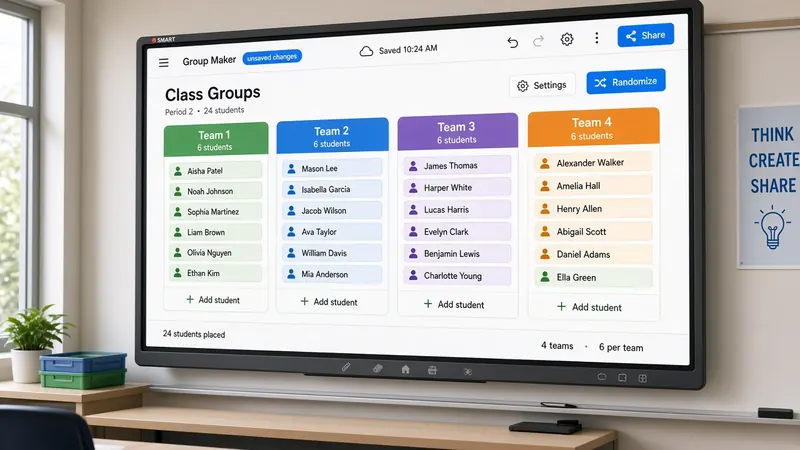
Free Random Group Maker for Teachers
Split your class into fair teams for centers, labs, and projects. Paste names, choose group size, and reshuffle anytime.
Random group maker
Stop spending ten minutes on group assignments
You know the scene. You say "get into groups of four" and immediately hear negotiating — who sits with who, who refuses to work with who, who mysteriously needs the bathroom until teams settle. Hand-picking feels fair in the moment but eats prep time and still leaves someone unhappy.
A random group generator projected on the board changes the dynamic. Students watch names shuffle. The outcome is visible. Complaints still happen, but they are shorter because the process looked neutral. You are not playing favorites. The screen decided.
MyClassScreen's group maker lives on the same classroom board as your timer, noise meter, and name picker. That means one tab, one projection, one morning setup — not five different websites during a station rotation when you already have twenty things to monitor.
When random groups beat chosen groups
Random is not always the right call. Long-term project teams might need skill balancing you handle manually. But for a Tuesday lab, a discussion round, or a review game, random groups get kids working with people outside their usual circle. That alone is worth the shuffle.
Centers and station rotations are where I use this most. Four groups, eight minutes per station, timer running on the same board. Groups appear before anyone moves. Students find their names, go to the right spot, and the rotation starts. Total setup under a minute if the roster is saved.
For science labs, random partners reduce the "we always partner together" problem without you maintaining a spreadsheet of pairings. Shuffle again next week and the pairs change automatically.
Handling odd numbers and absences
Real classes rarely divide evenly. A group of twenty-seven split four ways leaves one team short. The group maker distributes names as evenly as it can — sometimes you get a group of three next to groups of four. Tell students ahead of time that uneven groups happen and the smaller team gets a modified task or extra time.
Absences are simpler. Delete missing names before you shuffle, or take attendance first and paste the present list only. Reshuffling after a sick day takes seconds if the roster is already loaded. Do not let perfect attendance block you from using random groups on imperfect days.
Building a station rotation that runs itself
The group maker works best paired with other board widgets. Traffic light on green for active station work. Timer counting down each rotation. Noise meter on a low threshold so volume stays manageable while you confer with one group.
After the timer buzzes, hit shuffle again if you want new mixes at each station — or keep groups stable for a multi-day project. Your call. The tool supports both without extra setup.
Need one student to share out from each team? Add the random name picker to the same board and pick a reporter from each group list verbally or by narrowing names. Two tools, one screen, no tab switching.
Saving lists so Monday mornings are fast
Typing twenty-eight names every period is nobody's idea of a good start. Save board layouts with rosters attached — first period, second period, after-lunch section that always arrives wound up. Open the board, shuffle, teach. Our getting started guide walks through saving if you have not set that up yet.
The demo above runs in your browser session. The full Groups widget on your saved board works the same way with more layout options — resize it, move it next to your timer, and leave it there all year.
When students push back on random groups
Expect some grumbling the first few times, especially in middle school. Acknowledge it, then hold the line. "I hear you — shuffle again next activity if you want a different mix." Offering one reshuffle per month for project teams sometimes buys goodwill without abandoning random assignment entirely.
For conflict-heavy pairings you know will not work, pull those two names before shuffling and set them aside manually. Random does not mean ignoring safety or IEP accommodations. You still make the final call — the tool just handles the other twenty-six names.
Print is optional but helpful for subs: screenshot the groups or write them on the board after shuffling. Substitutes appreciate anything that reduces "who is in my group?" questions while you are out.
Elective and high school classes with smaller rosters still benefit. Three groups of five for a debate prep session, two groups of twelve for a gallery walk — same tool, different numbers. Adjust group count between activities without leaving the board.
Cooperative learning does not require you to spend Sunday night designing teams. Random groups get students talking to someone new, which is often the actual goal of a quick activity. Save your energy for the task itself — the prompt, the rubric, the materials — and let the board handle who sits together.
If you run a flipped or project-based classroom, keep a groups widget on your default board all year. Students learn where to look when you say "shuffle" and transitions get faster by October. That saved minute per activity adds up across a week.
Popular ways to use group maker
Centers & stations
Split the class into balanced rotation groups in seconds before students leave their seats.
Lab partners
Form lab teams without friendship clusters — everyone watches the shuffle on the board.
Discussion tables
Reshuffle talking groups so students work with different peers each week.
Timed projects
Pair the group maker with a timer for sprint-style collaboration blocks.
How to create groups in under a minute
- 1 Open MyClassScreen and add the Groups widget to your board — or try the demo at the top of this page.
- 2 Paste your roster with one student name per line.
- 3 Remove anyone absent today.
- 4 Choose how many groups you need or how many students per group.
- 5 Click shuffle and let the class watch the groups appear on the projector.
- 6 Point each team to their station or task. Reshuffle for the next activity if you want new mixes.
Use group maker on your full classroom board
Combine Groups with a timer and traffic light for station rotations that run themselves.
Open free classroom screen