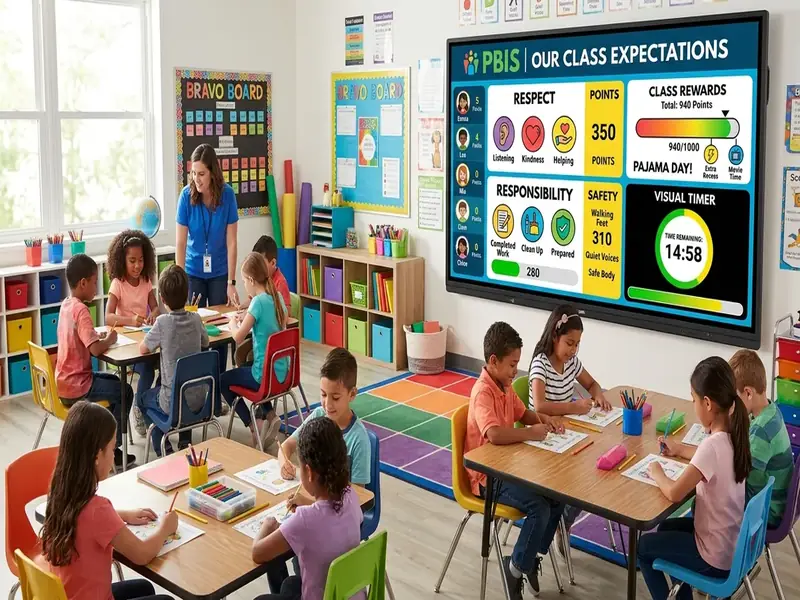
A PBIS classroom screen puts your positive behavior supports where students look all day: on the projector. Positive Behavioral Interventions and Supports is a framework, not a product, and it asks teachers to define expectations, teach them directly, acknowledge students who meet them, and respond consistently when they do not. A projected board cannot do that work for you, but it can make the expectations visible every minute of every period.
This guide shows how timers, traffic lights, a noise meter, and posted expectations map to the core classroom PBIS practices. You can build the whole setup on the free classroom screen in a few minutes and save it for every class.
What classroom PBIS asks of your room
The Center on PBIS describes classroom PBIS practices as positive, proactive supports that include teaching expectations, establishing routines, encouraging appropriate behavior, and responding to challenging behavior. Its practice guide, Supporting and Responding to Students' Social, Emotional, and Behavioral Needs, lays those practices out in detail for teachers.
Several of those practices depend on students knowing exactly what is expected right now. That is where a projected screen helps:
- Expectations can be posted in plain language beside the activity they apply to.
- Routines can be supported with the same timer and cue every day.
- Prompts can be given with a color change instead of a verbal reminder.
- Acknowledgment can happen in front of the class through a shared goal.
The screen supports your system. It does not replace the teaching, the relationships, or your school's matrix.
For example wording, see our list of classroom rules ideas.
Visual timers and transition expectations
Transitions are one of the most common times for problem behavior, because expectations are less clear between activities than during them. A visible timer makes the transition finite and predictable.
Pair each timer with a one-line expectation. Instead of a plain "2:00," label the countdown "Transition: materials away, eyes on board." Students know both how long they have and what done looks like. Use the same label and duration for the same transition every day until it runs on its own.
Precorrection fits neatly here. Before you start the timer, ask one student to describe the steps of the transition, then press Start. The reminder takes ten seconds and prevents many redirects. The classroom timer page covers labels, visual bars, and running multiple timers.
Traffic lights and voice-level expectations
Voice level is one of the expectations teachers restate most often. A projected traffic light turns that restating into a single click. For scripts and routines, see our full traffic light behavior system guide. Many PBIS classrooms use a simple mapping:
| Color | Voice expectation | Typical activity |
|---|---|---|
| Green | Normal working voices | Group work, labs, stations |
| Yellow | Whisper, partner only | Partner reading, quiet questions |
| Red | Silent | Direct instruction, tests, independent reading |
Teach the colors explicitly in the first week. Model each level, practice switching between them, and point to the light rather than repeating yourself. Consistency matters more than the specific mapping, so keep the same meanings all year.
Noise meters and self-regulation
A traffic light sets the rule. A noise meter shows whether the room is following it. Put both on the board and students can compare the two without you saying a word.
The MyClassScreen noise meter uses the device microphone and a Move the microphone closer to or farther from the class, or lower the computer's input level in system settings. Ask students to talk at the target level for the activity, then adjust the slider until that level sits in green. Audio is processed in the browser and not recorded or stored, which is worth mentioning to families.
In a PBIS frame, the meter is a feedback tool, not a consequence. Use it to acknowledge the class ("We stayed in green for the whole lab") far more often than you use it to correct.
Acknowledging expected behavior on the board
PBIS emphasizes noticing and acknowledging students who meet expectations. A projected board makes group acknowledgment easy to see.
- Class goals. Add a scoreboard with one column for the class. Award a point when the room meets a transition goal or holds a voice level through an activity.
- Specific praise in text. Post a short note such as "Period 3 transitioned in under two minutes all week" in a text box at the start of the next class.
- Shared rewards. Tie a set number of class points to a short, agreed reward, such as a brain break game or music during work time.
Keep public tracking positive and group-based. Individual behavior records belong in your school's system, not on a projector where peers can read them. For a themed week such as Unity Day, see these Unity Day and Red Ribbon Week screen ideas.
Need ideas for what students can earn? See our list of 50 classroom reward ideas.
Putting it on one morning board
A single saved board can carry the whole PBIS toolkit. A practical layout:
- Top left: a text box with your schoolwide expectations, for example Be Safe, Be Respectful, Be Responsible, and what each looks like in this activity.
- Top right: the traffic light, set to the current voice level.
- Center: the agenda or task instructions in a large text widget.
- Bottom left: a transition timer with a label.
- Bottom right: the noise meter during group work, removed during silent tasks if it distracts.
Save it as a template and duplicate it for each period so every class sees the same structure. If your school also uses CHAMPS, our CHAMPS classroom screen guide shows how to post activity-by-activity expectations on the same kind of board.
Teaching the board in the first two weeks
Visual cues only work after students learn what they mean. Plan short, explicit lessons.
- Day 1: introduce the expectations text and the traffic light. Model each voice level and practice switching.
- Day 2: add the transition timer. Rehearse one transition three times, celebrating improvement.
- Days 3 to 5: add the noise meter during one partner activity. Calibrate with students watching.
- Week 2: start acknowledging class goals on the scoreboard and reduce verbal reminders.
When a routine breaks down later in the year, reteach it the same way: model, practice, acknowledge.
What a screen cannot do
A PBIS classroom screen helps with Tier 1, universal supports. It does not address the needs of students who require targeted or individualized support.
- It cannot collect the behavior data your team uses for decisions.
- It cannot replace a function-based plan for a student with persistent challenges.
- It cannot build the relationships that make expectations meaningful.
- It cannot make a noise meter fair if the task itself is unclear.
Use the screen to keep expectations visible and consistent. Use your team, your data, and your relationships for everything else.