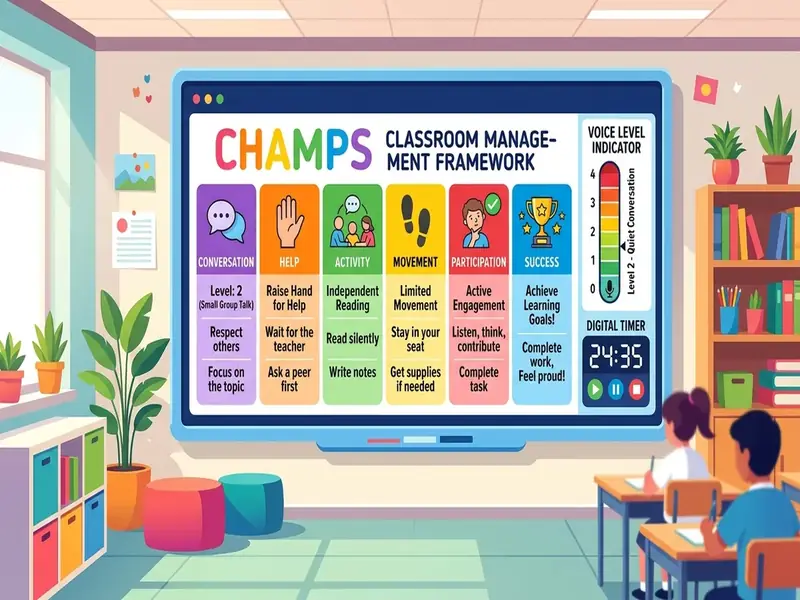
A CHAMPS classroom screen turns your expectations chart into something students can read for every activity, all period. CHAMPS, developed by Safe & Civil Schools, organizes expectations around six questions: Conversation, Help, Activity, Movement, Participation, and Success. A projected board lets you post those answers for the current task and change them in seconds when the task changes.
This guide maps each CHAMPS letter to a widget, shows a sample board for a 45-minute block, and explains how to teach the display. You can build it now on the free classroom screen and save one layout per activity type.
Why put CHAMPS on a projected screen
CHAMPS asks teachers to clarify expectations for every classroom activity and transition, then teach them directly. According to Safe & Civil Schools, the CHAMPS approach is proactive, positive, and instructional, and it is designed for grades K-8, with a companion program for secondary classrooms.
Printed CHAMPS posters work, but they have limits. Changing a poster for every activity takes effort, so many rooms end up with one generic chart that never changes. A projected board shows the expectations for this activity, right now, in large type. When you switch from direct instruction to partner work, the chart switches with you.
CHAMPS chart on your classroom screen
The simplest layout is six small text boxes, one per letter, arranged in a column or grid. Add a traffic light for voice level and a timer for the activity. Each letter below includes the widget that fits it best.
C: Conversation
Can students talk during this activity, and if so, with whom and how loudly? Post the voice level in a text box, for example "Level 1: whisper to your partner only," and set the traffic light to match. During group work, add the noise meter so the class can see whether the room matches the posted level.
H: Help
How do students get help? Write the method plainly: "Ask three before me," "Raise your hand and keep working," or "Put your name on the help list." If you run a help queue, a small text box can hold the list of names in order.
A: Activity
What is the task, and what is the end product? Put the instructions in a large text box, including the product, such as "Complete problems 1-6 in your notebook." For multi-step activities, use the learning objectives widget or a numbered list so students can check off steps.
M: Movement
Can students get out of their seats, and for what reasons? Specify: "Stay seated. Pencil sharpening only during transitions," or "Move freely between stations when the timer ends." For stations, pair this box with a rotation timer.
P: Participation
What does active participation look like? Describe observable behaviors: "Writing the whole time," "Each partner explains one answer," or "Eyes on the speaker." When you want to share out, the random name picker makes participation expectations fair and predictable.
S: Success
What does success look like at the end? Post a clear finish line, such as "Six problems done with work shown" or "Exit ticket submitted." A countdown timer beside this box shows how much time remains to reach it.
Sample board for one 45-minute block
Here is how a CHAMPS board might change across a typical middle school math period.
| Segment | Minutes | C | H | A | M | P | S |
|---|---|---|---|---|---|---|---|
| Warm-up | 5 | Level 0 | Raise hand | Solve the posted problem | Stay seated | Writing the whole time | Answer in notebook |
| Mini-lesson | 12 | Level 0 | Hold questions for the pause | Take guided notes | Stay seated | Eyes on the example | Notes match the board |
| Partner practice | 15 | Level 1 | Ask your partner first | Solve problems 1-6 | Stay with partner | Both partners explain | Six problems checked |
| Exit ticket | 8 | Level 0 | Raise hand | Answer one question | Stay seated | Independent work | Ticket submitted |
| Transition | 5 | Level 1 | Ask a neighbor | Pack up materials | To bins and back | Follow the routine | Seated, ready to leave |
Save one board per segment type, or keep a single board and edit the six text boxes as you go. Editing takes a few seconds per box, and the traffic light and timer carry most of the change.
Teaching the board the first time
Students need to learn how to read the display before it can guide them.
- Introduce one letter at a time. Spend a few minutes on each, with examples and non-examples.
- Practice with a real activity. Post a full chart for a short task, then ask students to point to where they would look for each answer.
- Rehearse a switch. Change the chart from quiet work to partner work, and have students describe what changed.
- Check understanding. Ask a few students to explain the current expectations in their own words.
- Acknowledge success. Name the specific letters the class followed well.
Plan short reviews after long weekends and breaks, when routines often slip.
Common CHAMPS-on-screen mistakes
- Too much text. If students cannot read a box from the back row, it will not guide them. Keep each letter to one short line.
- Charts that never change. A chart that stays the same all day stops being read. Update it when the activity changes.
- Rules without teaching. Posting expectations is not the same as teaching them. Model and practice.
- Mismatched cues. If the chart says Level 0 but the traffic light is green, students will follow the more convenient signal.
- Public shaming. Use the board to post expectations and acknowledge the class, not to call out individuals.
CHAMPS with PBIS
Many schools use CHAMPS inside a schoolwide PBIS framework. The two fit together well: PBIS provides the schoolwide expectations and systems, and CHAMPS clarifies what those expectations look like during each classroom activity. On the screen, you can post your schoolwide values in a small banner at the top and the CHAMPS letters below. Our PBIS classroom screen guide covers the schoolwide side, including acknowledgment and voice-level charts.
For the full framework, the CHAMPS book from Ancora Publishing, now in its third edition, is the official teacher resource. If you want free background on proactive routines first, the IRIS Center at Vanderbilt University offers an online module on key concepts and foundational practices in classroom behavior management.
What a screen cannot do
A CHAMPS board makes expectations visible. It does not supervise, correct, or build relationships. You still circulate, give specific praise, and respond calmly and consistently when expectations are not met. For students who need more support, the display is a helpful reminder, but it is not a substitute for an individual plan.
If you need short, positive classroom rules examples to sit alongside CHAMPS, see this list.