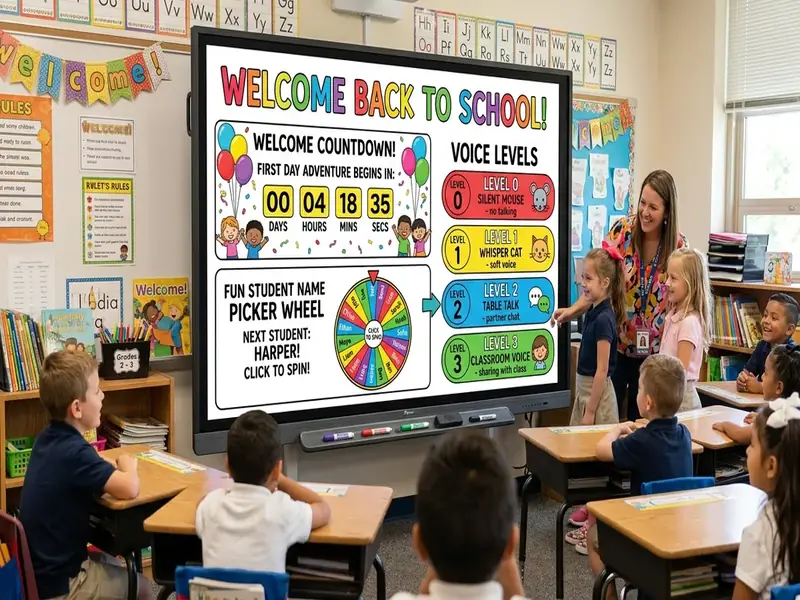
The best first day of school smart board ideas do more than say "Welcome!" They show students what to do the moment they walk in, introduce routines you will use all year, and keep the day moving without a long lecture on rules. A few well-chosen tools on the board can carry a lot of that work.
Below are eight ideas you can set up the night before on the free classroom screen. Each one introduces a routine, not just an activity, so the first day becomes practice for the rest of the year.
1. A welcome countdown at the door
Students arrive nervous and unsure where to sit. A welcome board answers their first questions before they have to ask.
- Text widget: "Welcome to Room 12! Find your name tag and sit down."
- Clock: so students can see the time.
- Countdown timer: labeled "Class starts in" and set to finish when the bell rings.
The countdown gives the arrival window a clear shape. When it reaches zero, everyone knows the day has started. Use the same layout every morning, and students will learn the entry routine without a speech about it.
2. Learning targets in large text
State the day's purpose on screen in plain words. On the first day, targets might be "I can find my way around our classroom" and "I can name three classmates." Use large type and put them in the same spot you will use all year.
Point to the targets at the start and end of class. That small habit teaches students to look for the day's goal every day.
3. Voice-level rehearsal
The first day is the easiest time to set voice expectations, because nobody has formed habits in your room yet.
- Add a traffic light and a noise meter to the board.
- Explain the colors: for example, red for silent, yellow for whisper, green for table talk.
- Practice each level for a few seconds while students watch the meter respond.
- Adjust the Move the microphone closer to or farther from the class, or lower the computer's input level in system settings.
Students usually enjoy seeing the meter react to their voices. It turns a rule into a quick game and sets a shared reference for the year. The noise meter tool page explains sensitivity and privacy.
4. Fair name games
A random name picker makes the first day's introductions feel fair. Paste your roster (first names only), then use it for a get-to-know-you question: "Name, favorite food, and one thing you did this summer."
Turn on the option to remove names after they are selected, so each student is chosen once. Let students pass the first time if they are shy, and come back to them later. This models the participation routine you will use for the rest of the year.
5. Instant partners and groups
The group maker sorts your roster into pairs or small groups in one click. On the first day, use it for a quick partner interview, then reshuffle for a second round so students meet more classmates.
Project the groups so students can find their partners without asking. The group maker page shows how to set group size or number of groups.
6. A quick poll check-in
A two-question poll gives you a snapshot of how students feel. Try "How are you feeling about this year?" with options like excited, nervous, and not sure. Students answer by show of hands while you tap the counts into the live poll, so no devices are needed.
Keep the poll lighthearted, and do not ask about anything students might not want to share publicly. A more personal check-in works better on paper.
7. A drawing-board parking lot
New students have questions they may not want to ask aloud. Add a drawing board labeled "Parking lot" and invite students to write questions on sticky notes that you copy onto the board, or let them write directly on an interactive panel during work time. Answer a few before the end of class.
Drawing board strokes reset when the page reloads, so take a photo of the board if you want to keep the questions.
8. A calm closing routine
End the first day with the same closing you plan to use all year: a short exit prompt and a timer. On day one, the prompt could be "One thing you are looking forward to" or "One question you still have." Collect answers on paper at the door.
Adjusting the ideas by grade level
- Kindergarten and first grade: keep text to a few words, add pictures to the visual timetable, and practice voice levels with the whole class together. Use a visual bar timer instead of digits.
- Grades 2 to 5: add the name picker introductions and partner interviews, and let students help set the noise meter's green zone.
- Middle school: keep the welcome board brief and move quickly to a partner activity, since students often see several first-day speeches in a row.
- High school: focus on the entry routine, the learning targets, and one community activity, then give students a real task so the first day feels like class.
For the rest of the first week, our guide to back-to-school classroom screen setup covers rosters, saved boards, and routines.
Save the board tonight
After school, open the board you used and save it with Save Board on this device. Tomorrow, open the same saved board and change only the learning targets and prompts. Most of the layout stays the same all week.
If you want a ready layout, the Morning Meeting, Agenda, and Exit Ticket templates in the templates library are good starting points.
A sample first-day flow
For example, a teacher could plan the first class like this:
- Arrival: welcome countdown, first task on the desk.
- Welcome: introduce yourself and the learning targets.
- Routines: voice-level rehearsal with the traffic light and noise meter.
- Community: random name picker introductions.
- Partners: group maker interview in two rounds.
- Check-in: a quick hands-up poll.
- Closing: exit prompt with a short timer.
Each step introduces a tool students will see again, so by the end of the week the board feels familiar.
Building community from day one
Routines matter, but so do relationships. Maggie Espinola's Edutopia article on helping students collaborate and connect from day one suggests activities such as an interactive syllabus review and learning students' names and birthdays early. Pair activities like these with your board routines so students feel both welcome and prepared.