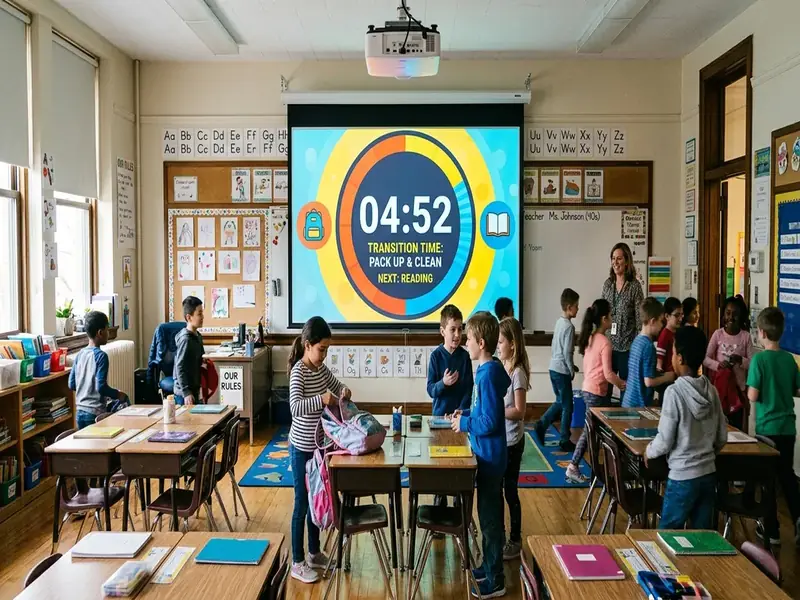
Classroom transitions with timers work when the timer is only one part of the routine. A countdown on the wall tells students how long they have, but it does not tell them what "done" looks like, how loud they may be, or what to do if they finish early. Put those pieces in place and the timer becomes a calm, visible anchor instead of a buzzer students race.
This guide covers how to define the finish before you start the clock, which transitions to practice first, when not to use a race, and how to run station rotations as a loop. Every step can be set up on the free classroom screen with a timer and a text widget.
Why transitions deserve planning
Every class has many small moves: coming in, getting materials, switching from a mini-lesson to practice, cleaning up, and leaving. Each one is a chance for momentum to slip. In his Edutopia article on mastering classroom transitions, Todd Finley describes three kinds of transitions (entering, switching activities, and exiting) and argues they should be taught like any other procedure, through explanation, modeling, rehearsal, and review.
A timer helps with the rehearsal and review. It gives everyone the same reference point, and it lets you notice whether the routine is getting smoother week by week.
Name the finish position before you start the clock
The most common transition mistake is starting a countdown without describing the end state. Students hear "two minutes" and move, but everyone pictures something different.
Before you start any transition timer, answer three questions out loud and put the answers on the board:
- Where should students be? At their seats, on the carpet, with their group.
- What should they have? Notebook open to a new page, pencil out, laptop closed.
- What voice level applies? Silent, whisper, or normal talk.
Then add a text widget beside the timer, for example: "Seats. Science notebook open. Silent." Students can check themselves against the words instead of asking you.
Use the timer label
Label the timer with the transition's name, such as "Clean up" or "Move to groups." When students see the label, they know which routine is running. MyClassScreen lets you run multiple labeled timers, so the transition timer can sit beside the main work timer without confusion.
Three transitions worth rehearsing in the first week
You do not need to teach every transition at once. Start with the three that happen most often.
Entering the room
Entry sets the tone for the whole period. Rachel Fuhrman's Edutopia piece on helping older students enter and exit smoothly suggests deciding in advance on the noise level, where students go, what materials they need, and how long they have to settle.
On the board:
- A text widget with the first task.
- A countdown for the settling time.
- A voice-level signal, such as the traffic light set to yellow.
Switching from instruction to practice
This is the transition that most often loses time, because students must change materials and attention at once. Keep it short and specific: "Put slides notes away. Take out the practice sheet. Start problem one." A one- or two-minute timer is usually enough once the routine is learned.
Leaving the room
A consistent closing prevents the rush to the door. Show a closing timer with a checklist: materials returned, chairs pushed in, exit ticket handed in. Students leave when the checklist is done, not when the bell rings.
Rehearse, time, and review
A transition routine gets faster through practice, not reminders. A simple cycle works:
- Model it. Walk through the transition yourself or with a volunteer.
- Practice it with the timer running.
- Review it right away. What went well? What slowed us down?
- Repeat it the next day and compare.
For example, a teacher could write each day's clean-up time on the board for a week so the class sees its own progress. The goal is a routine that feels automatic, not a record.
Do not make every transition a race
Timers can create urgency, and some transitions benefit from a little energy. But a race is not always the right message.
Finley's article shares advice from author Mike Linsin to avoid starting transitions with the word "go," because it cues students to rush. The same idea applies to countdowns. If a routine involves carrying materials, moving furniture, or working with younger children, speed can lead to spills, bumps, and frustration.
Ways to keep the timer calm:
- Give generous time at first, then shorten it gradually.
- Use a visual bar instead of large digits for young learners, so the countdown feels less like a stopwatch.
- Praise the quality of the transition, such as quiet movement or careful setup, not only the speed.
- Skip the timer for transitions that are going well without it.
Station rotations are transitions in a loop
Stations multiply transitions. With four groups rotating every twelve minutes, you might have four or five transitions in a single lesson. A clear system keeps them from eating the period.
Set up the board
- Use the group maker to create groups, or type fixed groups into text widgets.
- Add a text widget for each station with a short task description.
- Add a work timer for the station time and a separate short timer for the move.
- Show a rotation order, such as "Group 1 moves to Station 2," so nobody has to ask where to go.
Run the loop
- When the work timer ends, start the move timer.
- Students clean up, move, and sit at the next station before the move timer ends.
- Start the next work timer once everyone is settled.
The Station Rotation template in the templates library provides a starting layout. For a broader set of timer routines by grade level, see our classroom timer strategies.
Adapting transitions for different learners
Some students find transitions harder than others, especially changes they did not expect.
- Give a warning before the transition timer starts, such as "In one minute we will clean up."
- Keep the visual timetable on screen so students can see what comes next.
- Offer a job, such as passing out materials, to students who need to move.
- Keep routines consistent so the transition becomes predictable.
The classroom timer tool page explains the visual bar mode and multiple-timer options that support these adjustments.